Disney PhotoPass Problem? Skip the Line and Use the QR Code
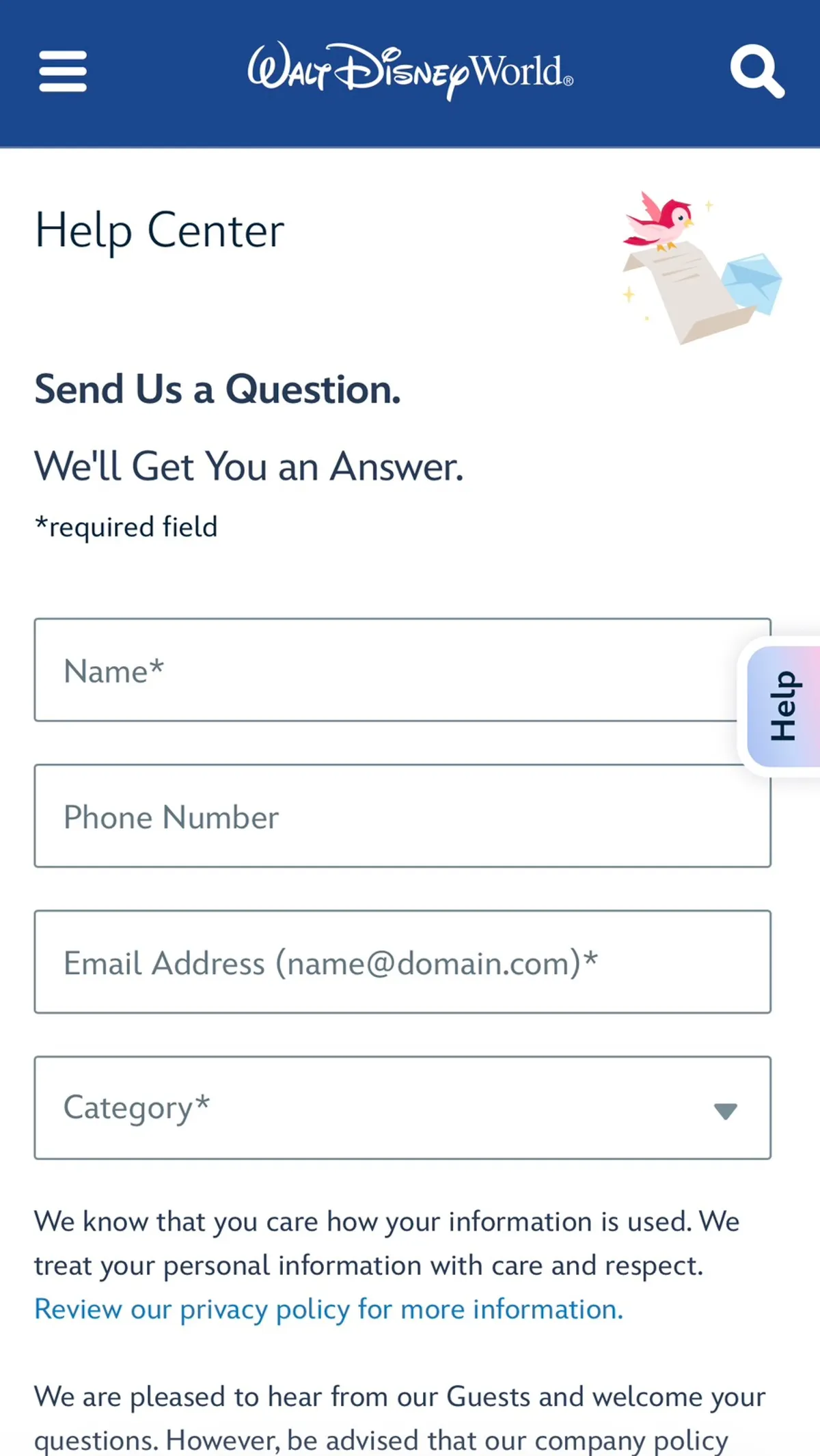
- For PhotoPass problems, a cast member now hands you a QR code card that links to Disney's online Help Center
- Choose the "Disney PhotoPass" category and submit online instead of lining up at Guest Services
- Recovery gets harder over time, so report issues the same day and enter your email correctly
Show contents (7)
Ride photos and PhotoPass photos are some of the best souvenirs of a Disney trip! But once you’re actually in the parks, problems like “my photo wasn’t taken” or “I can’t see my video” pop up more often than you’d think.
Walt Disney World recently changed how PhotoPass problems are handled! Now, instead of standing in line, you can sort it out right away with 👉 a single QR code.
✨ A QR code that connects you straight to support
Now, if you run into a PhotoPass problem in the park, a cast member will hand you a card with a QR code. Scan it and 👉 you go straight to Disney’s online Help Center.
✔ No need to go anywhere ✔ No Guest Services visit ❌
It’s a great example of how Disney is increasingly moving to digital support.
📱 How to report a PhotoPass issue
It’s very simple. Scan the QR code, or go to this link: https://disneyworld.disney.go.com/help/email/
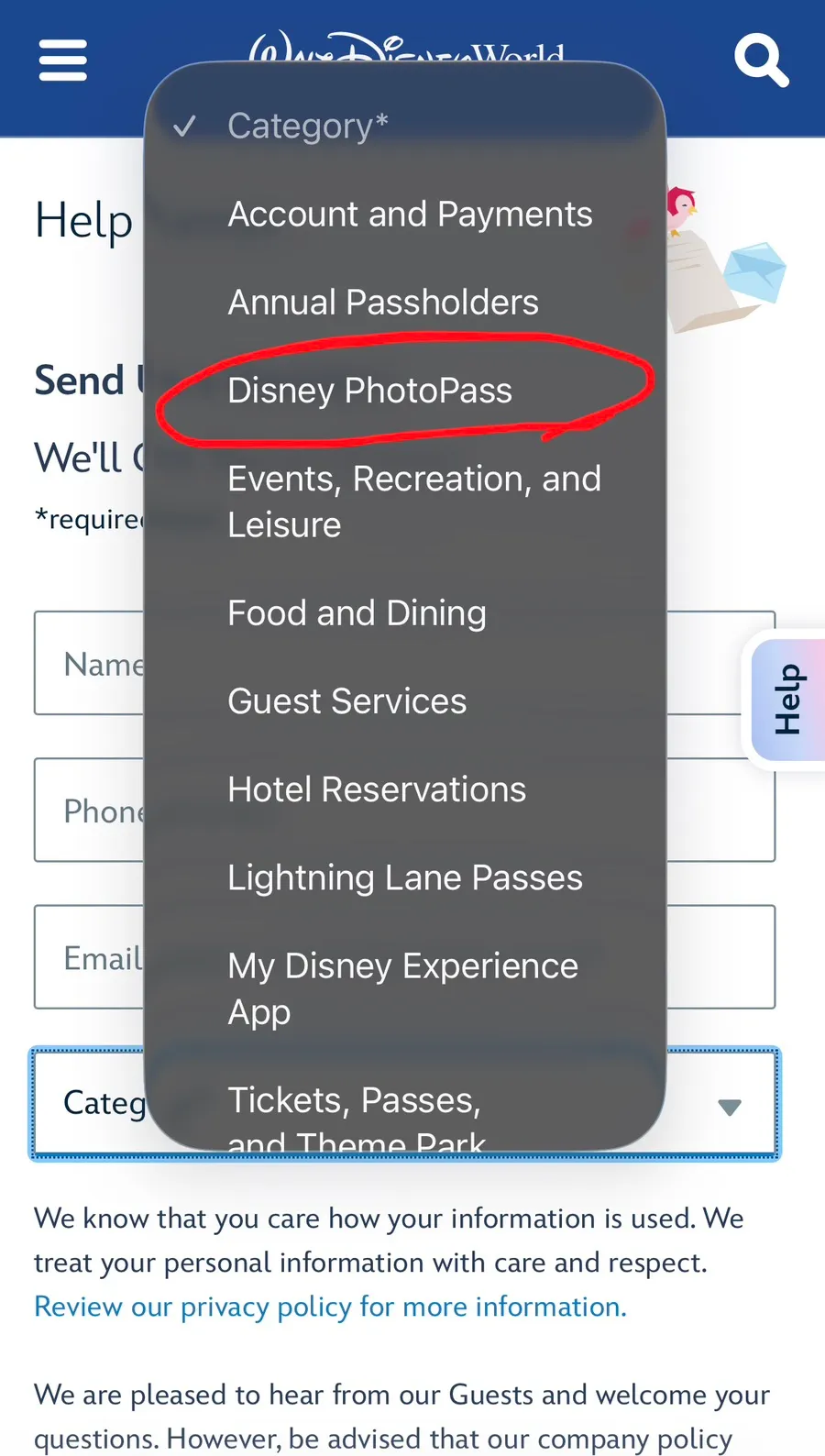
1️⃣ Choose an inquiry category 👉 Select “Disney PhotoPass”
2️⃣ Choose the specific issue 👉 Missing photos / errors / linking problems, etc.
3️⃣ Enter your details + describe the problem 👉 Once you submit, it goes straight to the right team.
😲 My own experience (missing TRON ride video)
I’ve actually had a PhotoPass problem myself. After riding TRON Lightcycle / Run, the ride videos of my family came through — except my parents’ video was missing.
TRON is an attraction that gives you a ride video rather than just a photo, so missing even one is a real letdown. To ask for it to be recovered, I had to put up with:
✔ walking all the way to Guest Services ✔ a long wait ✔ interrupting our day’s plans
Now that you can sort it out with a QR code without going anywhere, I think it’ll be much more convenient.
🔄 Old vs. new process
🔙 Before
✔ Ask a cast member on the spot ✔ Guest Services visit required ✔ Time spent waiting and walking
🔜 Now
✔ QR code → submit online ✔ Report it instantly, no walking ✔ Faster, more organized handling
👉 The key change: “you can fix it without standing in line.”
🎯 Why the change?
The reasons Disney introduced this system are clear:
✔ More visitors ✔ A surge in PhotoPass inquiries ✔ Heavier workload for cast members
👉 Result: stronger digital customer support 👉 A change aimed at faster, more efficient service.
📸 Check right away in these cases
👉 Report it immediately if:
✔ Your ride photo is missing ✔ Part of a video is missing ✔ Someone else’s photos are mixed in with yours ✔ There’s a MagicBand linking error
👉 Most issues can be fixed, but reporting quickly is the key.
Remember this during your trip:
✔ Recovery gets harder as time passes 👉 Report it the same day ✔ Enter your email address correctly 👉 Avoid photo delivery errors
Don’t lose the photos that make your trip memorable!
Want to know what PhotoPass (Memory Maker) is? 👇 See this post:
🔗 Walt Disney World Memory Maker / PhotoPass: How It Works, How to Buy and How to Use It
Curious about the pros and cons, and my review of PhotoPass? 👇 See this post:
🔗 Disney World Memory Maker / PhotoPass Review: Is It Worth It?
I hope my blog makes your trip a little more magical ✨ If you have any questions, feel free to reach out through the contact page. Thanks for reading!

Dreamer
I've loved Disney and theme parks since I was a kid. Questions? Reach out through the contact page. Contact →